Milky Matcha Font Review
As a web designer, I’m always on the lookout for fonts that bring personality and visual interest to digital projects. Milky Matcha, a script handwritten font, has quickly become one of my go-to choices for adding a touch of warmth and creativity to website layouts. Its bold yet cute style makes it perfect for headers, call-to-action buttons, and decorative elements that need to stand out without overwhelming the design.
A Warm and Playful Digital Presence
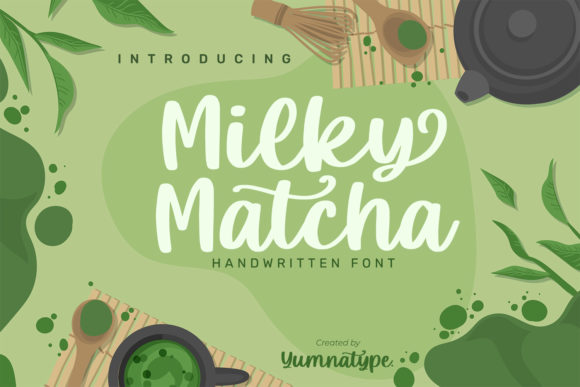
Testing Milky Matcha in a hero section of a boutique online store was the first time I really got to see how it performed in a real-world setting. The font’s soft curves and slightly irregular strokes give it a handcrafted feel that feels inviting and approachable. It works especially well when paired with clean, modern backgrounds or subtle textures, allowing it to shine without competing with other design elements.
On mobile devices, Milky Matcha retains its legibility and charm. I noticed that the font scales well on smaller screens, making it ideal for CTA buttons or short headlines where space is limited. However, I found that using it for longer text blocks—like body copy or dense information sections—was less effective. Its decorative nature can make reading more challenging, especially in small sizes or on low-resolution displays.
Perfect for Headers and Branding Elements
One of the most compelling aspects of Milky Matcha is how it elevates brand identity. When used in headers or logo text, it adds a personal and artistic touch that aligns well with creative businesses, artisanal brands, or lifestyle websites. For example, a coaching website I recently worked on used Milky Matcha for the main title and subheadings, which helped create a cohesive and memorable visual language.
The font also pairs beautifully with sans serif or serif fonts when used as a display typeface. I often combine it with a simple, neutral font like Lato or Montserrat for body text, creating a balanced contrast that keeps the design from feeling too busy. This pairing is particularly effective in landing pages where clarity and readability are key, but a unique aesthetic is still important.
Responsive Design and Web Performance
When testing Milky Matcha on different screen sizes, I was impressed by how consistently it rendered across devices. Whether viewed on a desktop monitor, tablet, or smartphone, the font maintained its character and visual appeal. This reliability is crucial for responsive web design, where consistency is essential for user experience.
I also checked how the font performed over image banners and dark backgrounds. On light backgrounds, the font’s slight weight made it easy to read, while on darker tones, it still stood out without needing additional styling. However, I recommend using it sparingly in these contexts to avoid visual clutter.
Use Cases for Web Designers
Milky Matcha is ideal for a variety of web design applications. It works well in hero sections, product banners, and promotional landing pages where a bold and eye-catching headline is needed. I’ve also seen it used effectively in portfolio sites to highlight project titles or client names, giving the site a more personalized and artistic feel.
For online stores, the font can be used in shop banners, product headings, or social media graphics. It adds a friendly and approachable vibe that complements handmade or artisanal products. However, I would advise against using it for navigation menus, form labels, or any text that needs to be easily scannable and functional.
Font Pairing and Commercial Use
When working with Milky Matcha, it’s important to consider font pairing. As a display font, it shines best when used in conjunction with simpler typefaces. A clean sans serif like Open Sans or a classic serif like Georgia can provide a strong foundation while letting Milky Matcha take center stage for emphasis.
Before using the font in commercial projects, I recommend checking the licensing terms. The font is PUA encoded, which means it’s accessible for a wide range of uses, including digital products, printables, and merchandise. However, it’s always good to verify that the license covers the specific use case you have in mind, especially if you’re designing for clients or selling digital assets.
Overall, Milky Matcha is a versatile and expressive font that brings a unique energy to web design. Its playful yet professional look makes it a great choice for creative businesses looking to stand out in a digital space. Whether you're designing a portfolio site, a product landing page, or a brand identity system, this font offers a fresh and engaging way to communicate your message.